Conference attendee management
Managing participants at conferences is one of the key tasks of organizers. The SF-CONFERENCE system offers a wide range of features that significantly facilitate this task, enabling smooth and efficient management of all aspects related to participation. In this article, we will look at the functions available in the "Users" section on the SF-CONFERENCE platform.
Participant table with advanced search and sorting options
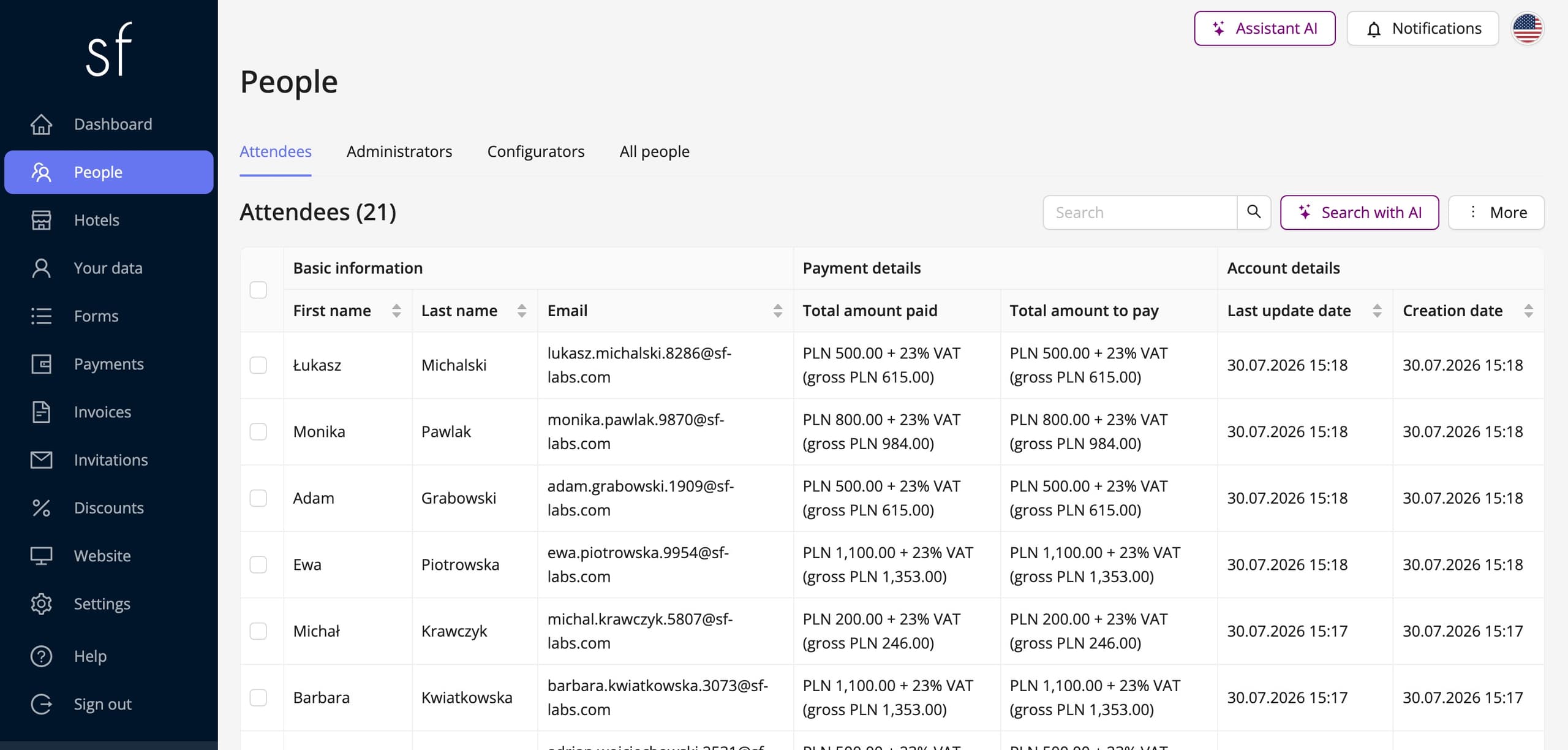
The main functionality of participant management is based on a clear table that contains all the important information about registered event participants. The system allows easy searching in the table using a simple text search mechanism. What's more, users have the ability to filter data according to various criteria, such as first name, last name, participant type or other defined attributes. This data can also be sorted, which makes it easier to organize and manage a large number of participants.
Export data to Excel file
For organizers who need to have access to participant data in external form, the system allows exporting the list of participants to an Excel file. This is a useful feature when there is a need for additional data analysis in a spreadsheet or transferring it to other teams.
Communication with participants
The SF-CONFERENCE system enables direct communication with participants. Organizers can send messages to all participants at once or selectively choose the people they want to address the message to. There is also the option of viewing the history of messages sent earlier, which allows you to control and monitor the communication.
Manual addition of participants
In addition to automatic registration through the system, there is also the option of manually adding participants. This feature is especially useful when we want to add people who have registered offline or have been invited in a special mode.
Editing participant data, reviewing payments and invoices
Organizers have full control over participant data. They can freely modify information about each participant, such as personal data, choices regarding conference packages, and also track payments and invoices related to participation. The system also allows issuing and managing invoices directly from the panel level.
Downloading the participation summary in PDF format
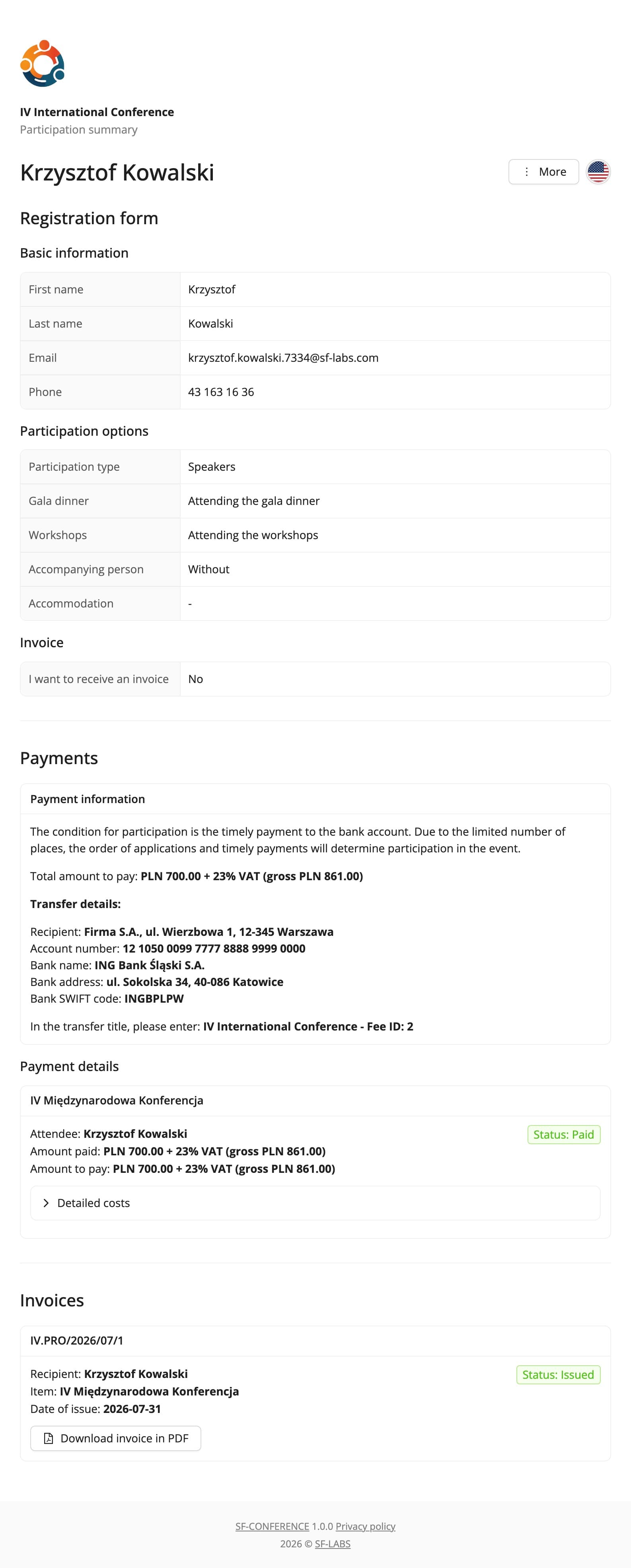
Each participant has an individual summary of their participation in the event. Organizers can download this summary in PDF format, which contains all the important data, such as payment status, participation options, and contact details. This tool is useful for both organizers and participants, who can receive full insight into their data in an accessible form.
Dedicated page for participants
The SF-CONFERENCE system also provides a dedicated page for participants, where each of them can quickly check the details of their participation. On this page, participants have access to information such as payment details, selected participation options, and invoices. Thanks to this, both organizers and participants can keep track of any changes.
Attendees and their data in one place
Participant management using the SF-CONFERENCE system is a tool that significantly facilitates the process of organizing conferences. Thanks to extensive functions for managing data, communication, payments and invoices, organizers can focus on other aspects of the event, being sure that all information about participants is well organized and available at your fingertips.
The attendee list - frequently asked questions
Can I export the attendee list to Excel?
Yes. Above the table are two download buttons: all attendees, or only the ones you have ticked. The export honours the filters and the selection, and every form field gets a column of its own in the file, grouped by section.
Can I message only selected people?
Yes. Tick the people in the table’s first column - with nothing ticked the message goes to the whole list. Because the list honours the filters, you can narrow it down to one group first, for instance to everyone with a particular participation type.
Can the message carry the recipient’s own details?
Yes. The message editor has a variables menu: first and last name, email address, access code and a link to the recipient’s private participation summary page. The system substitutes each person’s own values, and you can send yourself a test message before the real one goes out.
Does the attendee see their own data after registering?
Yes. Everyone gets their own participation summary page with their registration details, payments and documents. Which fields appear there is up to you, and chosen answers can be locked against editing once the registration has been submitted.
Can some data be hidden from the team?
Yes. Access is built on roles and permissions, and a single field can be marked as visible only to administrators - it then stays in the panel but reaches neither the attendee nor the export of anyone without the matching permission.
See also
How to add an attendee
Add an attendee manually from the panel, without waiting for them to register through the registration form.
How to run a survey among attendees
Collect feedback after the event or open workshop sign-ups. Send attendees a survey and read the answers in the panel.
How to send event invitations
Send guests personal invitations carrying their own link and discount, or share one registration link with a group.
Complete event management on a single platform. An event website, attendee registration and a full set of organizer tools.
2026 © SF-LABS sp. z o.o. All rights reserved
Entered into the register of entrepreneurs of the National Court Register kept by the District Court for Kraków-Śródmieście in Kraków, 11th Commercial Division of the National Court Register, under KRS number 0000886671. Share capital amount: PLN 5,000.