KSeF invoices for event attendees
A conference fee ends with an invoice, and in Poland invoices now go to the National e-Invoice System (KSeF). SF-CONFERENCE has a built-in integration with KSeF, so attendee invoices are issued from registration data and are sent to KSeF automatically. You don't retype buyer details into a separate program and don't send documents manually.
Below we describe how the integration works, which documents it supports and what the organizer and the attendee see after an invoice is issued.
What KSeF is and who it applies to
KSeF, the National e-Invoice System (Krajowy System e-Faktur), is a platform run by the tax administration through which structured invoices pass. In 2026, using it is mandatory in Poland. For an event organizer, this means that an invoice for a conference fee is no longer a regular PDF file sent by email, but a document that must be accepted by KSeF and receive a KSeF number.
The details of tax obligations depend on your situation, so for legal matters it is worth consulting with an accountant or tax advisor. This article describes what the system does.
How the integration works
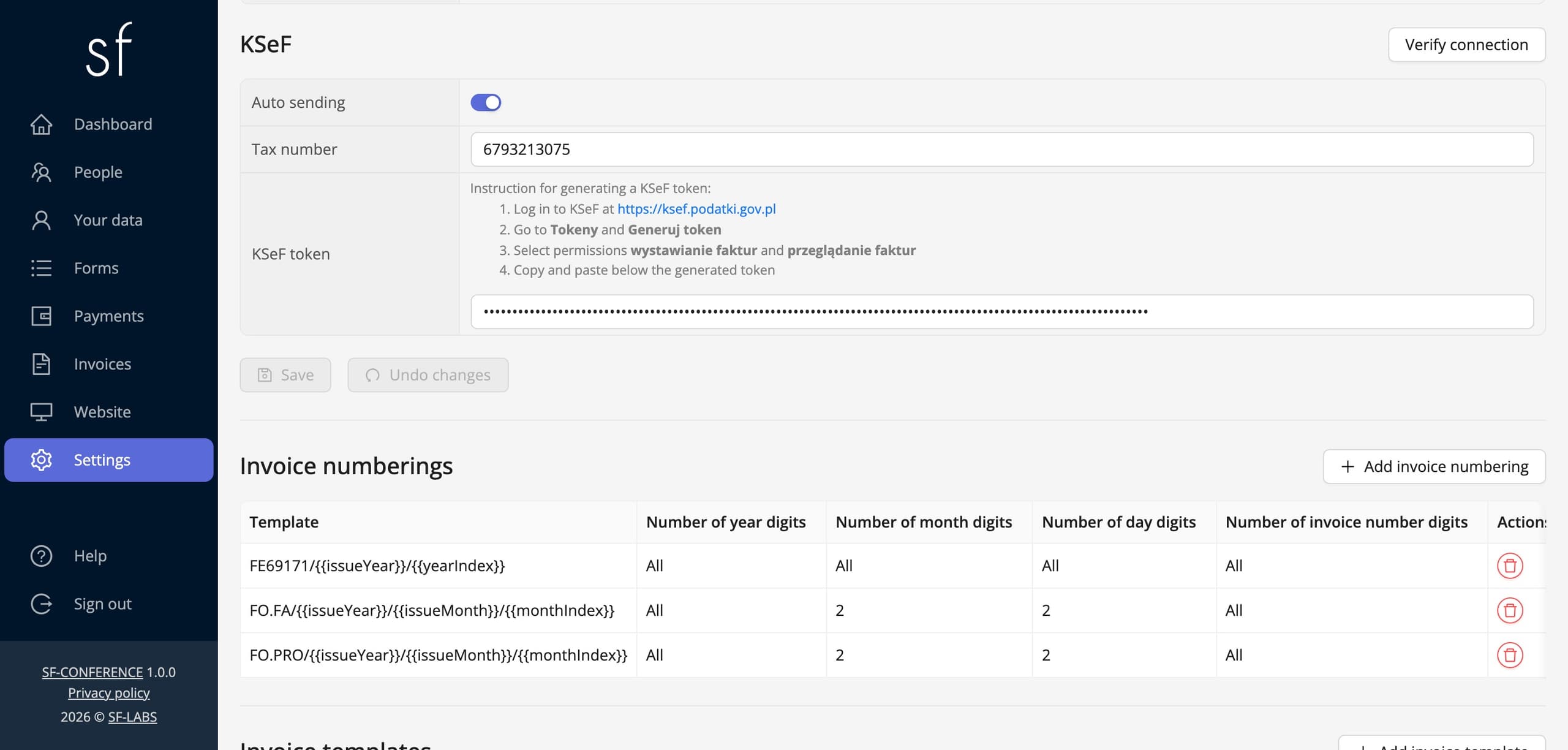
You enable the integration in the Settings item, in the Invoices section. In the KSeF part, you check Auto sending, enter your organization's NIP and KSeF token. The panel shows step by step how to generate a token in KSeF and which permissions to grant it: issuing invoices and viewing invoices. Authentication uses the token, so you don't need a certificate. The Verify connection button checks the configuration before the first invoice is created.
Invoices are issued automatically based on invoice templates. A template can issue a document After payment is created, that is, once the registration is accepted, or After payment is paid, that is, once the payment is received. An issued KSeF invoice is sent to KSeF automatically, in the structured FA(3) format, and the system waits until KSeF assigns it a number. Invoices with errors are clearly marked in the panel.
Which documents go to KSeF
- VAT invoice, the basic document for the conference fee.
- Advance invoice and final invoice, which references the KSeF number of the advance invoice.
- Correction invoices for each of these documents: price correction, buyer details correction and correction to zero. A correction invoice references the KSeF number of the invoice it corrects.
A proforma is also available, but by its nature it isn't sent to KSeF. So you can still send a proforma as the basis for payment, and issue the VAT invoice only after the payment arrives.
KSeF number, UPO and QR code
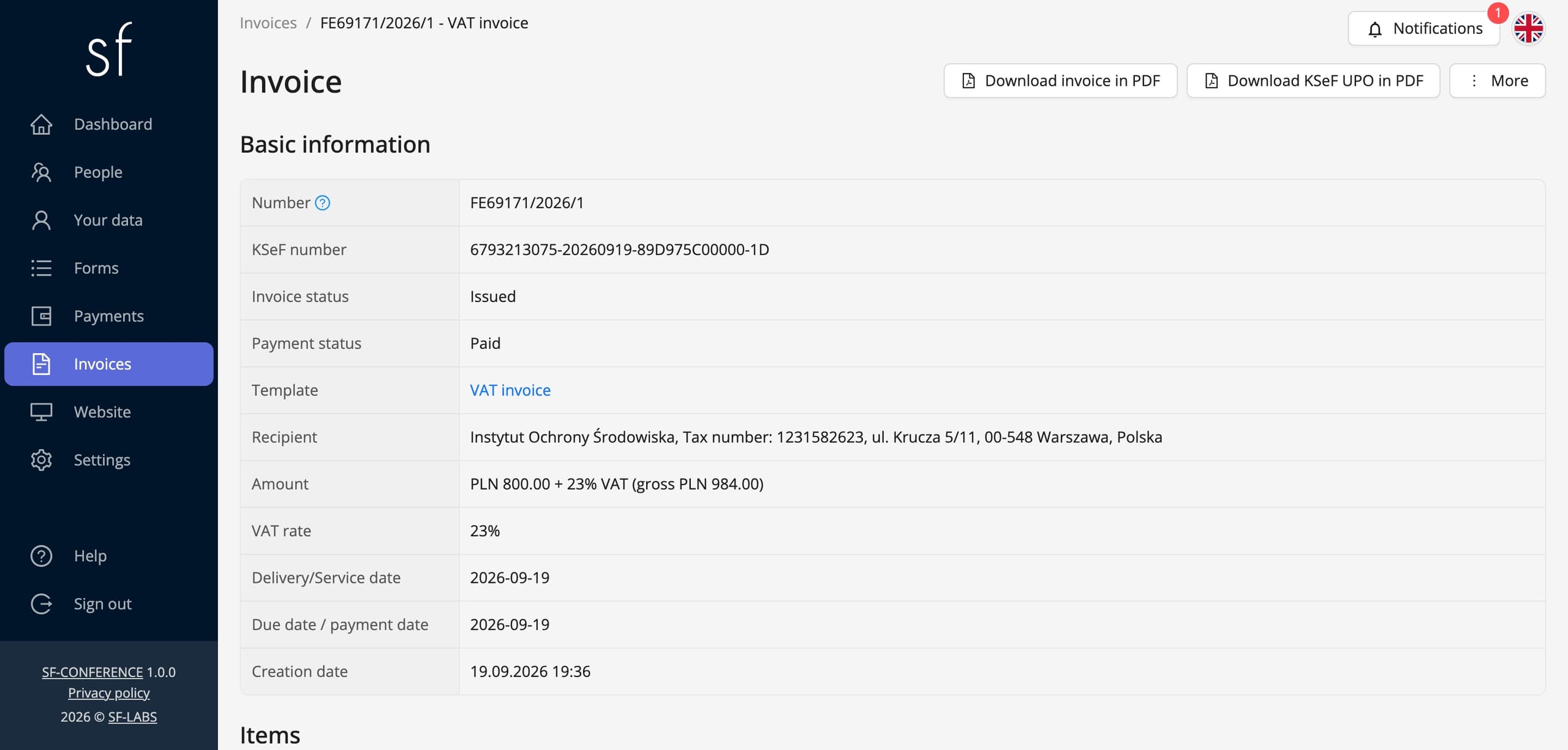
Once an invoice is accepted, the system saves its KSeF number and the UPO, the official confirmation of receipt, in PDF format. The invoice PDF is generated from the XML data returned by KSeF and includes the KSeF number and a QR code for verifying the document. In the invoice view, you see the KSeF number and download the UPO.
Attendees receive the invoice PDF by email the moment it is issued, and for group registrations it goes to the group representative. Attendees can also download all their invoices from their attendee account.
Invoices to a university or employer
Participation in a conference is often paid for by a university or employer, and not by the attendee. Buyer details come from registration form fields marked as invoice fields: company name, NIP, address, postal code, city and country. So the buyer can be an institution with its own NIP, and the attendee is only the person the fee applies to.
The form validates the NIP format, and company details can be filled in automatically from the GUS database based on the NIP number. A buyer from another European Union country receives an invoice with an EU VAT number, and buyers without a tax number are supported too. Read more about organizing such an event in the article on scientific conferences.
One invoice for a group
Payments with the same buyer details and in the same currency are combined into one invoice. An institution sending several attendees, for example through group registration handled by a representative, receives one document instead of several separate ones.
Bank transfer with a payment deadline
An unpaid invoice, issued for a traditional bank transfer, includes the payment due date and the organizer's bank account number. A paid invoice includes the payment date. This way the same mechanism handles both a university that pays after receiving the document and an attendee who paid online during registration.
VAT rates, exemptions and numbering
You set invoice numbering yourself, for example in the FA/2026/09/... format, so it matches the one your accounting uses. Available VAT rates include 23%, 8%, 5% and 0%, the "zw" exemption with a configurable legal basis, and reverse charge. You enter prices net or gross, and when selling in several currencies, the invoice includes the exchange rate used for VAT conversion.
Accounting export
You can export invoices to Comarch accounting software as a ZIP archive. Invoices issued outside the system can be saved as external ones, so all documents related to the event are in one place. We use the same integration with KSeF when issuing our own invoices to organizers.
Getting started
- Enable the invoices module and fill in the seller details in the Invoices section in settings.
- Generate a token in KSeF following the instructions from the panel, enter it together with the NIP and check Automatic sending.
- Click Verify connection.
- Set up invoice numbering and create a VAT invoice template with automatic issuing.
- Mark registration form fields as invoice fields so buyer details end up on the document.
The entire payment and invoice setup is described in the guide on accepting payments and issuing invoices, and the cost of using the system can be found in the pricing.
KSeF invoices - frequently asked questions
Do I need a KSeF certificate?
No. The integration connects to KSeF using a token you generate in KSeF with permissions to issue and view invoices.
When does an invoice go to KSeF?
Right after it is issued. The template decides whether the invoice is created after the registration is accepted or after payment, and the issued invoice is sent to KSeF automatically.
Is the proforma invoice also sent to KSeF?
No. A proforma is an informational document, so the system doesn't send it. KSeF receives VAT invoices, advance invoices, final invoices and correction invoices.
Can I issue an invoice to an attendee's university?
Yes. Buyer details come from the invoice fields in the registration form, so the buyer can be a university or employer with its own NIP.
Where will attendees get their invoice?
They receive it by email at the moment it is issued, and for group registrations it goes to the group representative. Invoices can also be downloaded from the attendee account.
How do I correct an invoice that was already sent?
You issue a price correction, a buyer details correction or a correction to zero. The correction invoice is also sent to KSeF and references the KSeF number of the invoice it concerns.
See also
How to accept group registrations
A representative registers several attendees with one form: shared fields, one collective payment and a company invoice.
How to edit the registration form
Add and change fields, set prices, dates and dependencies between answers and decide when registration is open.
How to collect payments and issue invoices
Set the currencies, bank transfer and online payments, and let the invoices issue themselves.
Complete event management on a single platform. An event website, attendee registration and a full set of organizer tools.
2026 © SF-LABS sp. z o.o. All rights reserved
Entered into the register of entrepreneurs of the National Court Register kept by the District Court for Kraków-Śródmieście in Kraków, 11th Commercial Division of the National Court Register, under KRS number 0000886671. Share capital amount: PLN 5,000.