System for managing scientific conferences
Organizing a scientific conference takes more than a sign-up form. First comes the call for abstracts and review, then attendee registration with different rates, invoices for universities and accommodation, and finally certificates. SF-CONFERENCE is a scientific conference management system that runs all of these stages in one panel, from call for papers to certificates of attendance.
The system is used by universities, institutes and scientific societies. This page is an overview of the platform's capabilities. The papers module is described in detail on the paper submission and abstract review page, and the whole process step by step in the guide how to organize a scientific conference.
Call for papers and abstract submission
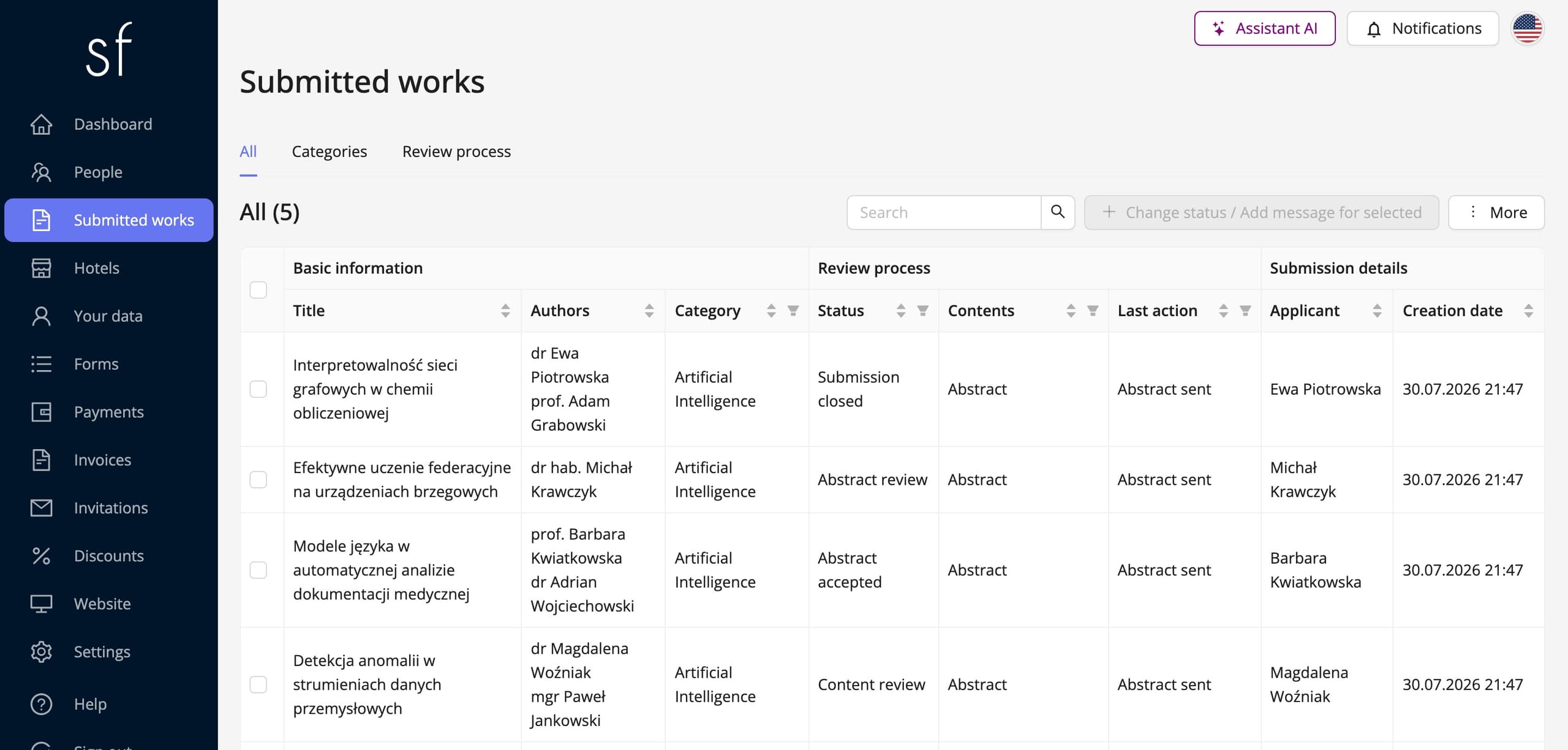
Paper submission is a separate module you enable in the event settings. Authors submit papers from their own account, and each submission appears right away on the list in the organizer panel. The default flow has two stages: first the abstract, and once it is accepted, the full text. Each stage has its own form and its own deadline, so abstract submission works independently of full-text submission.
You build the forms yourself from number fields, dropdown lists, text fields, checkboxes and files. Authors upload the paper content as a PDF file, and additional materials as a ZIP archive. Papers are assigned to topics that correspond to conference sessions or sections. The naming is up to you, too. If you talk about abstracts, posters or communications, the system will use that name everywhere, including messages to authors.
The review and the committee's decisions
Reviewer is a separate role that sees only the papers assigned to it. Assignment happens automatically based on the topics the reviewer is assigned to, or manually for each submission. Optionally, you can limit reviews to one per submission.
Evaluation happens at both stages: an opinion covers the abstract, and a review covers the full text. You also design the evaluation forms yourself, so the point scale, criteria and recommendation are your decisions, not a ready-made template. You can hide the reviewer's identity or the entire review content from the author, so the author only learns the decision.
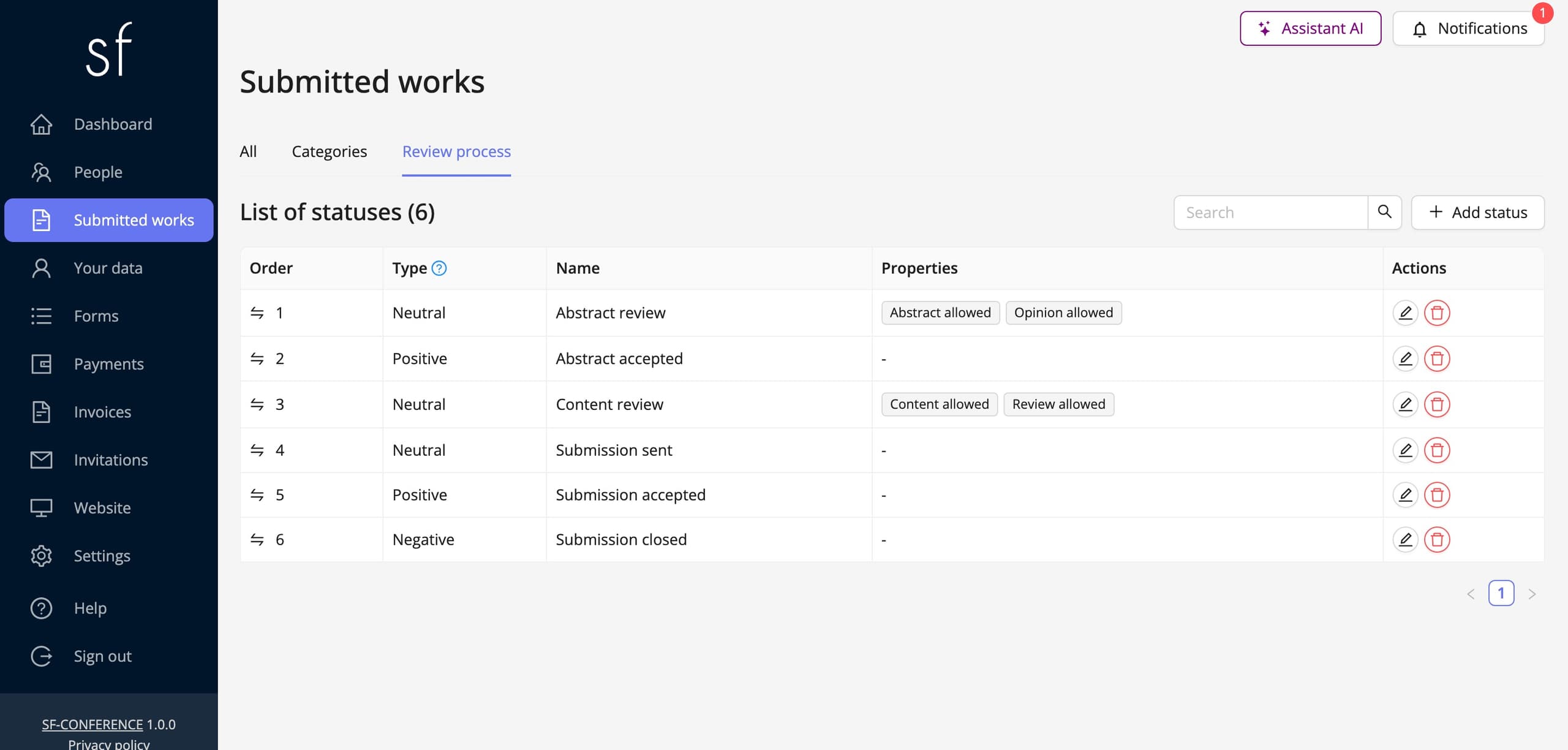
Committee decisions are submission status changes. You configure the statuses yourself, and each change can send the author a message, for example about the acceptance or rejection of the paper along with a comment. The correspondence stays with the submission, so later you can see what was agreed and when. The step-by-step setup is described in the guide on collecting papers.
Conference fees and rates for different groups
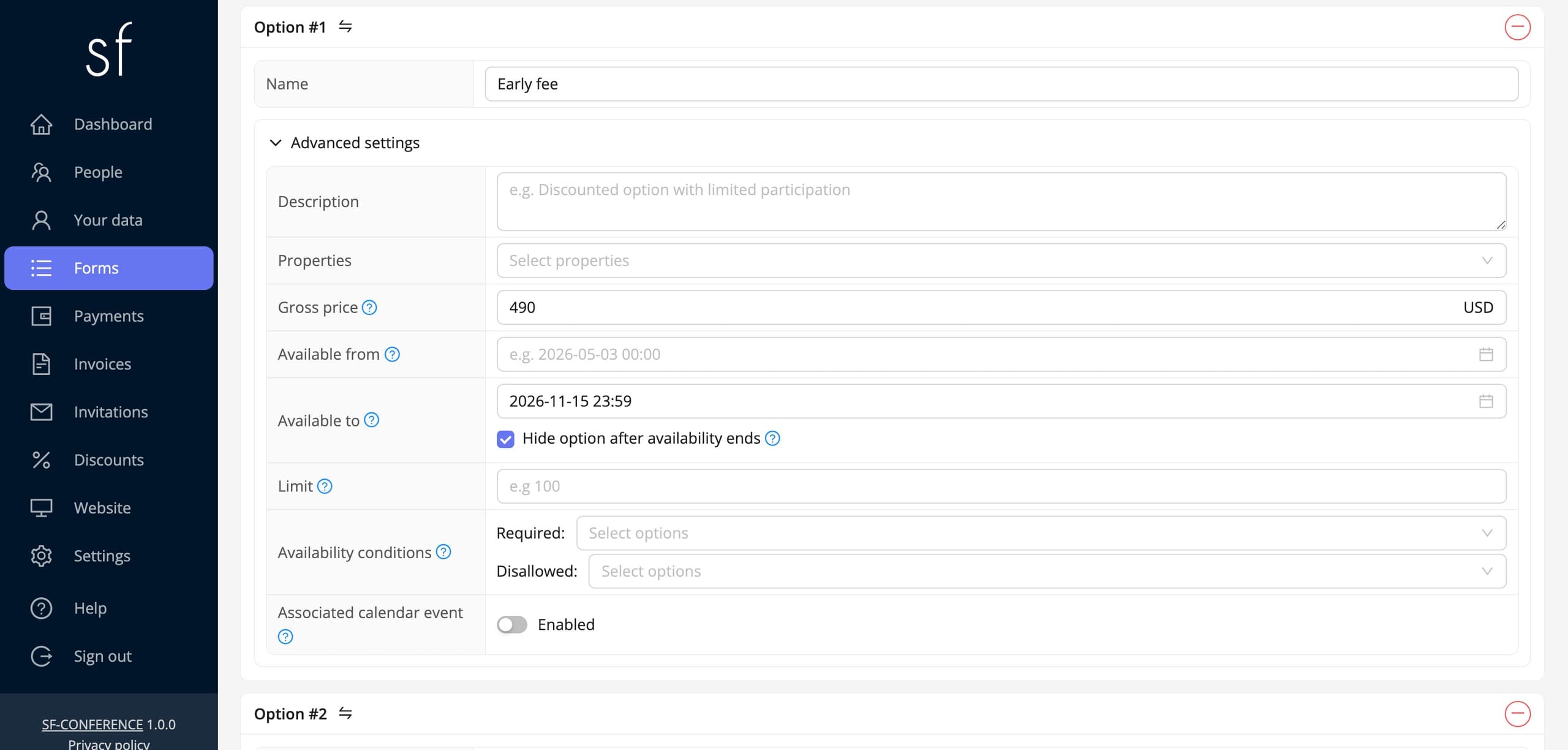
Each option in the registration form has its own price, separate prices in individual currencies, a capacity limit and an availability period from a chosen date to a chosen date. From these elements you build an early bird rate and a late fee, for example as an option with a lower price available only until a specific day. Options can depend on other answers, so a student or PhD student rate, a discount for society members and different fees for authors and listeners all fit in one form.
On top of that there are discount codes, fixed-amount or percentage, with a usage limit. Attendees pay online, with BLIK or a card, or by traditional bank transfer. An event can accept payments in multiple currencies, which is useful for international conferences.
Invoices for universities and KSeF
A researcher's participation is usually paid for by a university or institute. Invoice data fields let attendees name their employer as the buyer with its NIP number, and the system fetches buyer details from GUS using just the NIP number. Several attendees with the same buyer details can receive one shared invoice.
Before paying, attendees receive a proforma invoice, and for traditional bank transfers a payment deadline, which makes settlement in the university bursar's office easier. Invoices are sent to KSeF automatically, and you can read more about this on the invoicing in KSeF page.
Group registrations
When several people come from one department, a single representative can register the whole group. They receive the invoices and messages about the registered people, so the institute's office doesn't have to collect details from each person individually.
Accommodation
The accommodation module lets you add hotels and rooms, and attendees book a stay directly in the registration form, together with the conference fee. See the accommodation page for details.
Conference website and program
The event website builder has a program section with tabs for consecutive days, as well as space for the scientific committee and important dates. The website is built in the same system as the call for papers and registration, so the invitation to submit papers can lead straight to the form. The event can run in several languages, which for an international conference covers both the website and the forms. More on the event website page.
Badges, entry and certificates
Every attendee receives an entry ticket with a QR code, and you print badges with data from registration. At the entrance, codes are scanned with the mobile app, so you can see right away who has arrived at the conference.
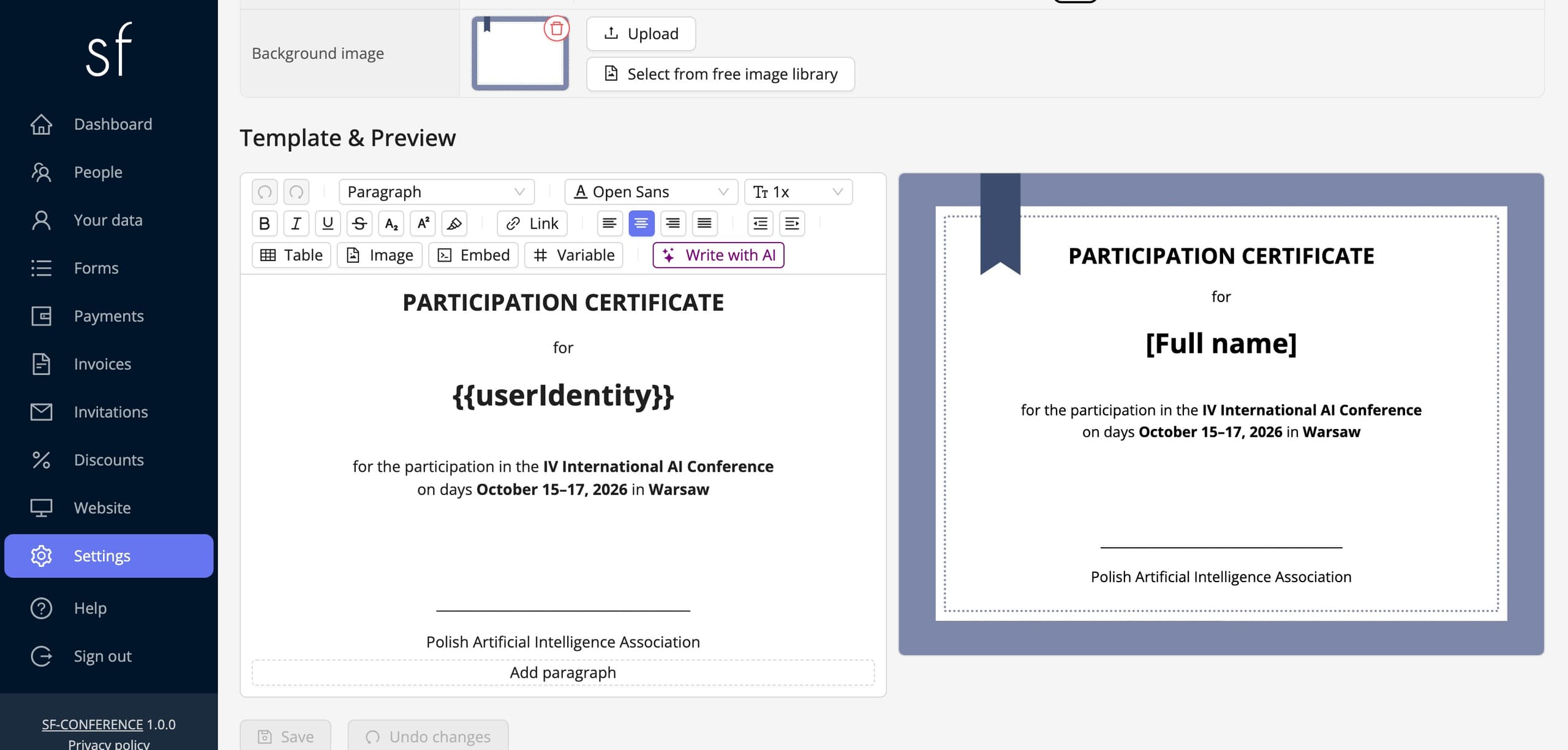
After the conference, attendees download a certificate of attendance. There is one template per event and it can include attendee details and any field from the registration form. Accepted attendees can download it as soon as you make certificates available. The certificate setup guide explains how to prepare the template.
Data export
You can export the submission list to an Excel (XLSX) file, and download paper files as a ZIP archive. It's a good starting point for preparing conference materials and for the committee's work outside the system.
Scientific conference schedule in the system
- Create an event, enable the papers module, define topics and build the forms.
- Publish the conference website with the committee, key dates and submission rules.
- Open the call for papers and collect abstracts until the deadline.
- Assign reviewers, collect feedback and announce decisions by changing statuses.
- Accept full texts of accepted papers and review them.
- Open registration with an early bird rate, rates for different groups, accommodation and invoices issued to universities.
- Publish the program, print badges and scan tickets at the entrance.
- After the conference, make certificates of attendance available.
Scientific conferences - frequently asked questions
Can I collect abstracts only, without full papers?
Yes. You configure submission statuses yourself, so the call can end at the abstract or also include the full text after the abstract is accepted.
Can reviews be anonymous?
You can hide the reviewer's identity from the author and keep the review content visible only to the organizer, so the author learns only the decision.
Can a university pay by bank transfer based on an invoice?
Yes. The buyer can be a university with its own NIP number, the system issues a proforma invoice before payment, and traditional bank transfer has a payment deadline. Invoices are sent to KSeF automatically.
How do I set an early bird rate and a student rate?
Each fee option has its own price and availability period, so an early rate is an option available until a chosen date. A student rate is an option that depends on the answer to a question about the attendee's status.
How do I prepare conference materials from accepted papers?
You can export the submission list to an XLSX file and download paper files as a ZIP archive. Based on that, you can prepare the materials in your own tool.
Can the conference be run in several languages?
Yes. An event can run in multiple languages, and attendees choose the language of the website and forms.
How much does a scientific conference management system cost?
You pay per attendee, with no subscription. See the current rates on the pricing page.
See also
How to edit the registration form
Add and change fields, set prices, dates and dependencies between answers and decide when registration is open.
How to collect papers and run the review
Run a call for papers: the submission form, topics, reviewers and submission statuses.
How to organize a scientific conference
A guide to a scientific conference: the call for papers, reviews, conference fees, accommodation and participation certificates.

Complete event management on a single platform. An event website, attendee registration and a full set of organizer tools.
2026 © SF-LABS sp. z o.o. All rights reserved
Entered into the register of entrepreneurs of the National Court Register kept by the District Court for Kraków-Śródmieście in Kraków, 11th Commercial Division of the National Court Register, under KRS number 0000886671. Share capital amount: PLN 5,000.