Conference registration form
Flexible form configuration
The SF-CONFERENCE system offers participants the opportunity to register for the event via a flexible and modern registration form that can be adapted to the individual needs of the event. The system provides an event management panel where, after logging in, organizers have full control over the content of the form.
In the administration panel you can:
- Add, edit and remove fields - The organizer can freely manage form fields, such as text fields, checkboxes, drop-down lists, etc. The form structure can be easily adapted to the needs of the event.
- Divide fields into sections - Form fields can be grouped into sections, which facilitates content organization and improves form clarity, especially for more complex registration forms.
- Set the appearance time of individual fields - It is possible to define which form fields are visible at specific stages of registration or for selected user groups. For example, you can set certain fields regarding accommodation preferences to appear only after selecting the option of stationary participation in the event.
- Control the availability of choices - The panel also allows you to control when different choices (e.g., ticket type, attractions) are available, enabling dynamic adjustment of the form as it is filled out.
- Set whether a field is unique, non-editable, visible in the participant table, statistics, or on the participation summary page - Organizers can specify which fields should be unique (e.g., email address), non-editable after completion, displayed in the participant table for quick preview, included in registration statistics, and also visible on the participation summary page, accessible to participants after completing registration.
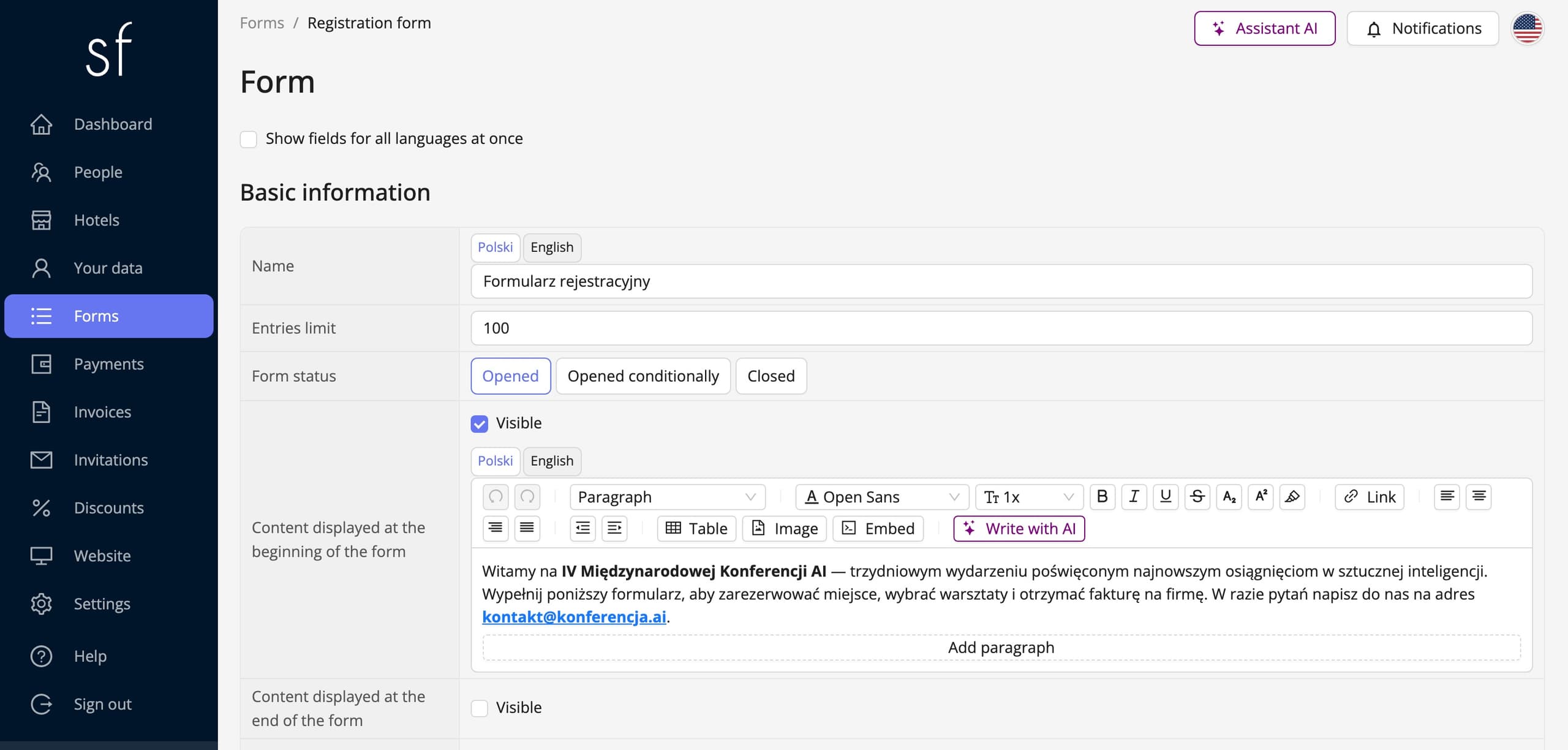
Information and text in the form
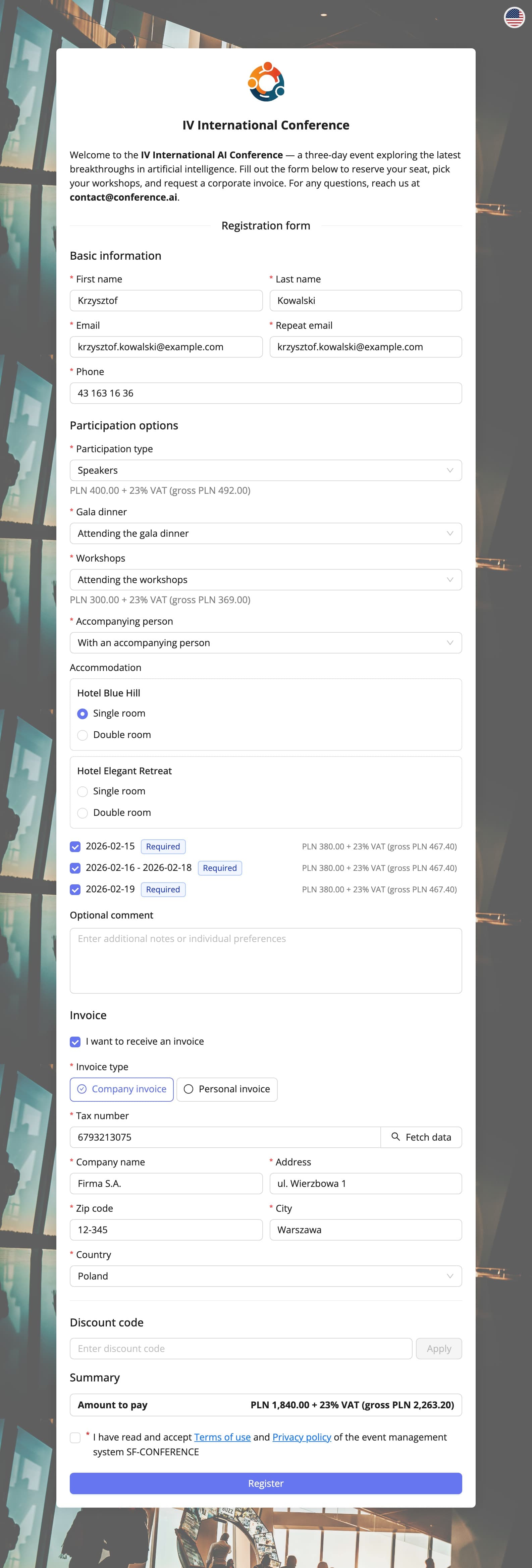
At the top and bottom of the form, you can place any information or text that will be visible to users. This makes it possible to convey key messages, such as event details, contact details, important registration instructions, or promotions that can attract more participants.
Controlling the opening and closing time of registration
In the administration panel, you can also control the moment of opening and closing of registration. The organizer can freely set the dates on which the form will be available to users and what information should appear on the page when registration is closed. For example, after closing the registration, the system can display a message with a link to the page with information about upcoming events or contact details.
Consents and legal clauses
Another element that can be freely configured in the form are consents and legal clauses. The organizer can add consents to the processing of personal data, acceptance of the regulations or other legal clauses required by privacy regulations. These elements appear at the bottom of the form, so that participants can express the required consents before submitting the application.
Form background
Additionally, the registration form offers the option of adding any image as a background, which allows you to adapt the visual side of the form to the visual identification of the event. The introduction of a personalized background increases the visual attractiveness of the form, emphasizing the unique nature of the conference.
The registration form in practice
The SF-CONFERENCE registration form offers a wide range of tools that allow for full customization of the registration process to the individual needs of the organizer. From field availability settings, through information messages, to managing legal consents - the administration panel provides full control over every element of the form. Additionally, the ability to personalize the background and messages about closed registration allows for maintaining a professional image of the event.
Thanks to these flexible features, the registration form becomes not only a tool for collecting applications, but also an effective element of promotion and event organization.
Attendees and registration - frequently asked questions
Does an attendee have to create an account to register?
No. A registration is submitted without creating an account - filling the form in is enough. An account is optional and earns its keep where the attendee is meant to come back to the system, for example to submit a paper. After registering, everyone gets a link to their own participation summary page, which opens without a login.
Can I close sign-ups at a specific time?
Yes. The form status has a conditional mode with a date and time for opening and for closing, so registration starts and ends on its own. The two dates are independent: you can set just the opening, just the closing, or a full window.
What happens when the places run out?
The form has an entries limit. Once it is reached the form stops accepting further registrations, even if the deadline has not passed. Limits can also be set separately for individual options - for one workshop, say, or one excursion.
Can the form be in several languages?
Yes. Every field, description and option has its own content in each language of the event, and the attendee sees the version matching the language they opened the page in.
Can I set an early-bird price?
Yes, and it needs no dedicated switch: the early-bird price is simply a second option on the same field, with a lower amount and an availability window of its own. The guide to building the registration form covers how to do it step by step.
See also
How to edit the registration form
Add and change fields, set prices, dates and dependencies between answers and decide when registration is open.
How to collect payments and issue invoices
Set the currencies, bank transfer and online payments, and let the invoices issue themselves.
How to add a discount code
A student rate, a partner code, or a discount applied automatically from the answers in the form.

Complete event management on a single platform. An event website, attendee registration and a full set of organizer tools.
2026 © SF-LABS sp. z o.o. All rights reserved
Entered into the register of entrepreneurs of the National Court Register kept by the District Court for Kraków-Śródmieście in Kraków, 11th Commercial Division of the National Court Register, under KRS number 0000886671. Share capital amount: PLN 5,000.