How to send conference invitations
Invited guests, speakers, partner representatives, VIPs. Some attendees do not arrive through open registration but through a personal invitation. In the SF-CONFERENCE system that is what the invitations module is for: it sends each person a separate email with their own registration link, optionally carrying a discount as well.
In the same place you will find registration links, an address for the form with some fields filled in advance. That is the answer for situations in which you are not inviting one particular person but a whole group: the staff of one company, the students of one faculty, or the people on a partner’s mailing list.
Turning the invitations module on
Invitations are a module. Under settings in the panel’s side menu, in the modules tab, turn on the invitations toggle. An entry of the same name appears in the side menu, and in it two tabs: invitations and registration links.
Sending personal invitations
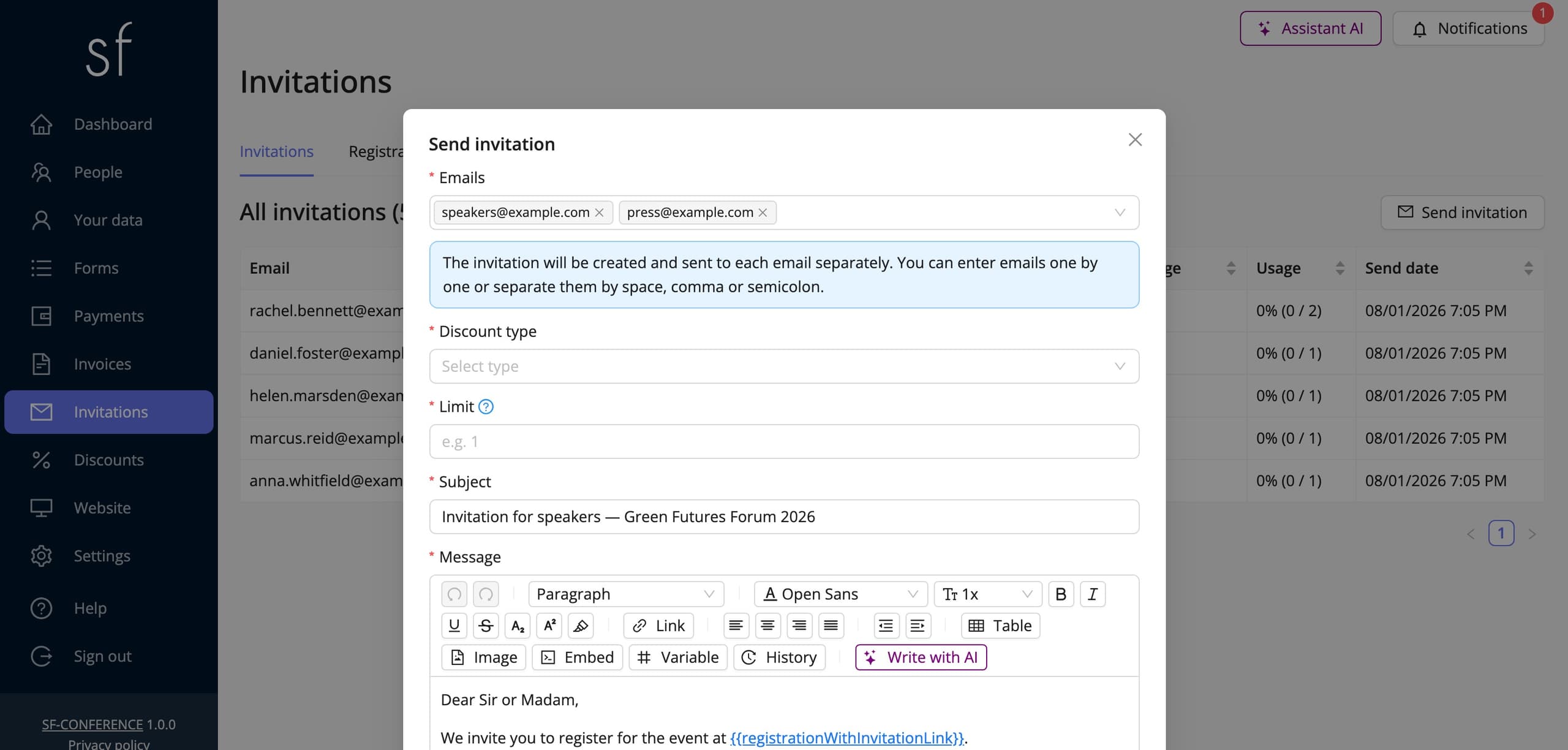
The invitation window starts with the email addresses field. You can type addresses one by one or paste a whole list at once. The system splits it on spaces, commas and semicolons. Every address gets its own invitation and its own link, so there is no risk of one person using up a pool meant for everybody.
Discount type and discount value let you attach a reduction to the invitation: percentage, fixed amount, fixed price, or none at all. A hundred per cent turns the invitation into free entry, so the guest need not know any code or type anything. Following the link from the email is enough. Limit sets how many times one invitation may be used by the same email address; for an invitation to a single person that is usually one.
Next come the subject and the message. The body opens with a ready draft in which the registration link is already placed. The most important element, because without it the invitation leads nowhere. The editor has a variables menu, so you can add the recipient’s first and last name or other details, and the system substitutes them for each person separately.
The last field is a compulsory declaration that you have the recipients’ consent to write to them. Invitations are marketing messages sent to addresses that never went through your form, so responsibility for the legal basis rests with the organizer. Before you send the whole list, use the send test message to yourself button. You will get the finished email with the variables substituted and can check that the link works.
Keeping track of the invitations you sent
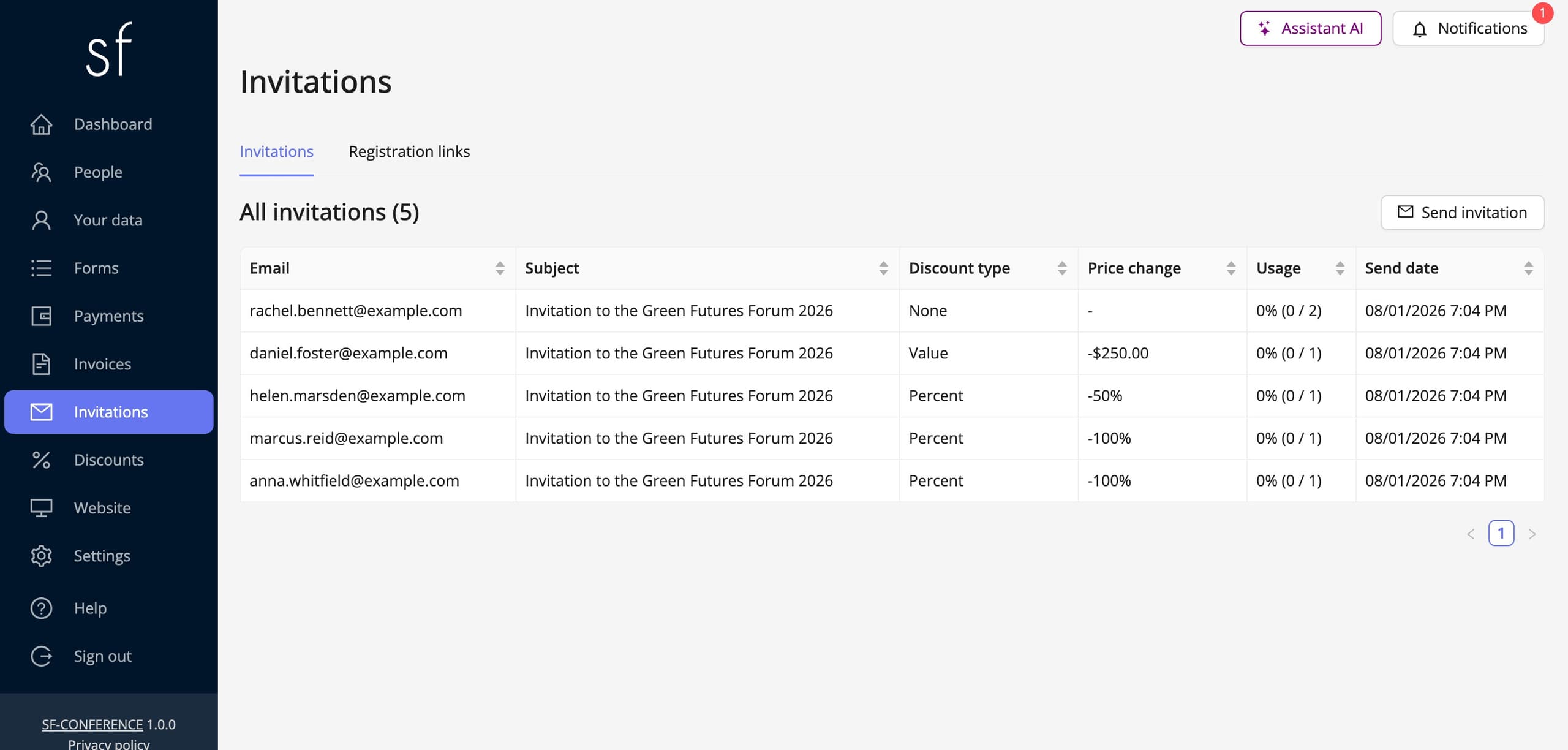
Every invitation sent has its own row in the table and its own page. That page shows the email address, the subject, the type and value of the discount, the limit, usage, how many times the invitation has been used, and the send date. The discount, the limit and whether discount codes are allowed can be changed afterwards, and an invitation that is no longer needed can be deleted.
The usage column is the most useful one in practice: it shows plainly which of the invited have already registered and which have not. That is a ready-made list of people to chase, with no reconciling of invitations against the attendee list.
Registration links for a whole group
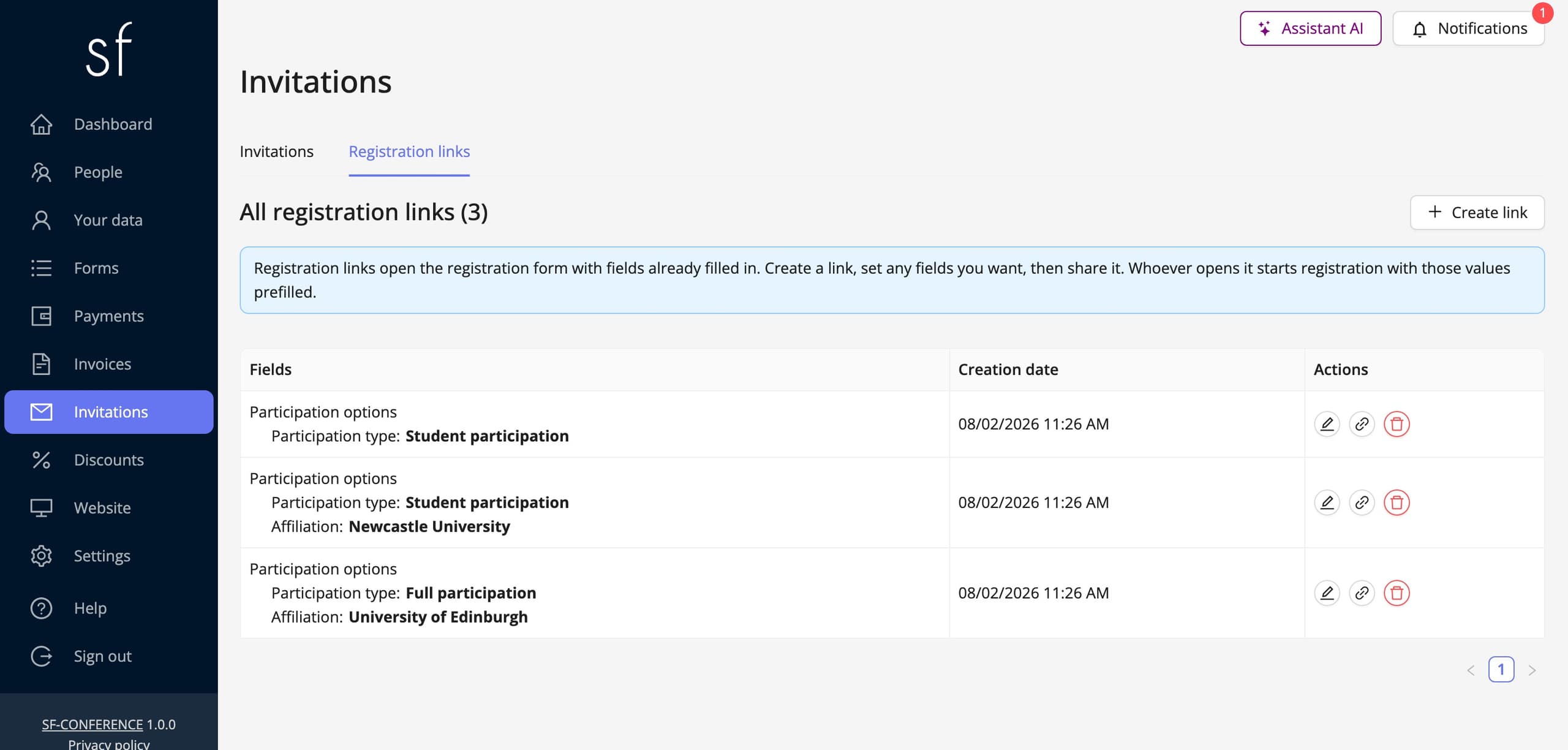
The second tab solves a different problem. Instead of emailing each person separately, you create one address that opens the registration form with some fields filled in advance. The create link button shows the whole form. You set in it only what should be decided for the attendee, and leave the rest empty.
The typical use is group registration: a link for the staff of one institution has the affiliation and participation type set in advance, so whoever opens it fills in their own details only. Fewer questions means fewer abandoned registrations, and the data in the attendee table is consistent, because the institution’s name does not get typed ten different ways.
You copy the finished link with the button in the table and send it out through a channel of your own, by email, on an intranet or in a partner’s newsletter. The link carries no per-address limit, so any number of people can use it; if you need to cap the number of sign-ups, set a limit on the registration form itself or on the individual options.
An invitation versus a discount code
An invitation is tied to a particular email address and sent by the system, and the discount is built into it. The guest types nothing. A discount code works the other way round: it is anonymous, you hand it out through any channel, and the attendee types it in themselves. There is more about codes in the adding a discount code instruction.
By default an invited guest cannot also enter a discount code, so the reduction from the invitation does not add up with a code. If you want to allow it, tick the Allow discount codes option in the invitation window. The code field will then appear at registration and on the payment. The option is only shown while the Discounts module is on, and without it an invitation always blocks codes.
Inviting works as well for one person as for a hundred: paste the whole list of addresses into the Email addresses field, and the system creates and sends a separate invitation to each of them, showing the progress on a bar below the form. An invited guest lands on the same form as everybody else, the difference being that their discount is already applied, so you need not maintain a separate registration path for guests. Who has not used their invitation you read off the Usage column. Invitations at zero are a ready-made list of people to remind.
Invitations in short
A personal invitation with its own link and discount goes out from the invitations tab, and a single shared address with fields already filled in is created in the registration links tab. Both lead to the same form, so invited guests end up on the same attendee list as everyone else, and how to work with that list is covered by attendee management.
See all instructions
Complete event management on a single platform. An event website, attendee registration and a full set of organizer tools.
2026 © SF-LABS sp. z o.o. All rights reserved
Entered into the register of entrepreneurs of the National Court Register kept by the District Court for Kraków-Śródmieście in Kraków, 11th Commercial Division of the National Court Register, under KRS number 0000886671. Share capital amount: PLN 5,000.