Attendee registration system: what it is and how to choose one
An attendee registration system is a tool that takes over everything that happens between announcing an event and an attendee entering the room. It consists of four parts: an online form, in which people sign up, an attendee database where registrations land, payments with invoices, and communication, that is confirmations and reminders sent automatically. A good system connects them so that a change in one place, for example a cancelled registration, is immediately visible in the others.
Many events start with a Google Form and a spreadsheet in Excel. For a free meeting of a few dozen people, that is a reasonable choice. The spreadsheet stops being enough the moment money is involved: you have to manually match transfers to registrations, issue invoices and keep track of who has already paid. Then come spot limits the form does not enforce, data changes reported by email, attendees from abroad who need a second language version, and GDPR, because a file with personal data circulates through several people's inboxes.
This guide describes what an attendee registration system should be able to do, how to compare pricing models, what questions to ask the vendor and how to test a system before moving your event to it. We use SF-CONFERENCE as an example, but the list of criteria works for any tool.
What an attendee registration system should do
Not every event needs everything on the list below. Go through it and mark the features you can't do without, and separately those that would be nice to have. A list prepared this way makes comparing offers much easier.
Registration form
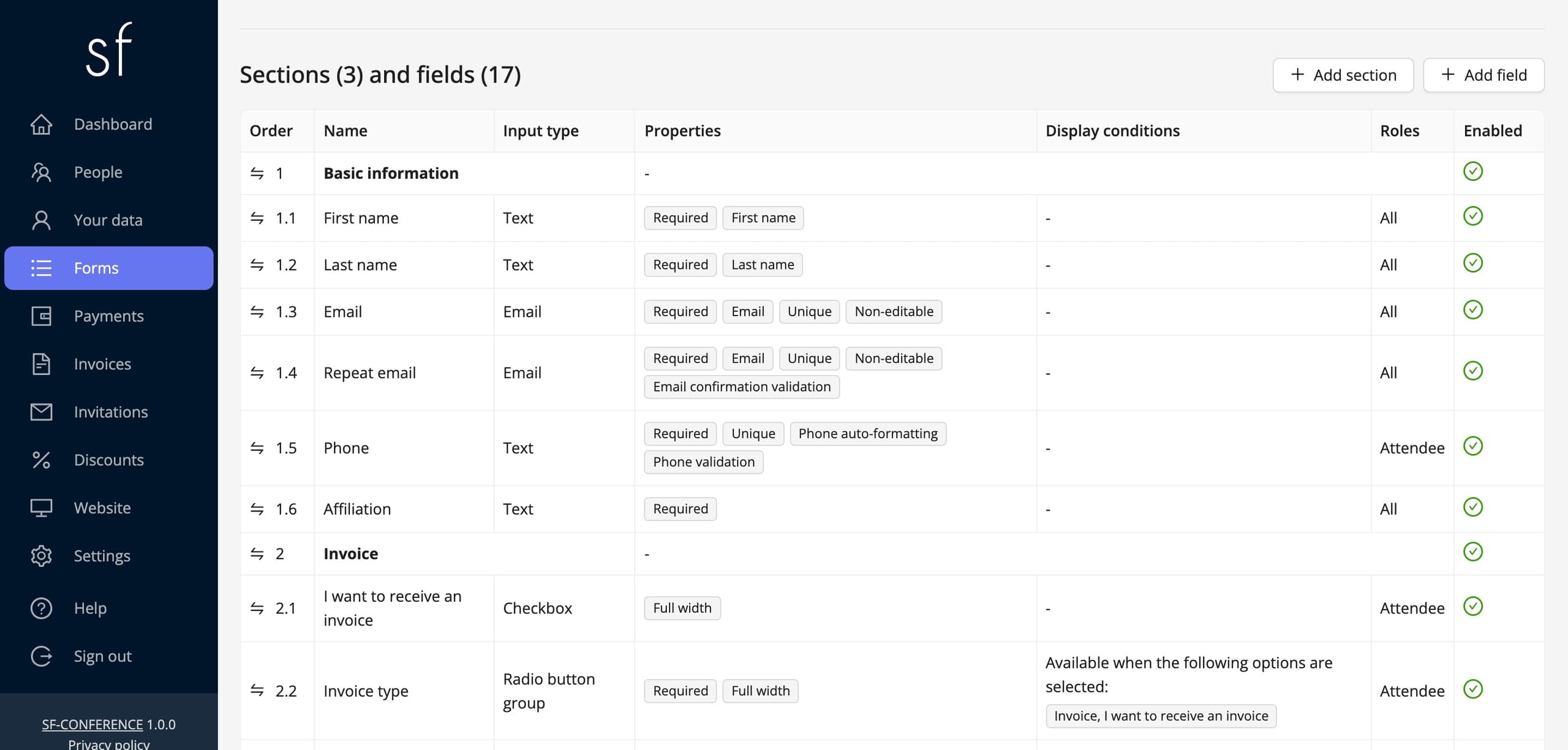
The conference registration form is the first thing attendees see, so the system should let you lay it out your way: text fields, dropdown lists, checkboxes, consents. Check whether you can mark fields as required and whether conditional fields work, that is, fields that appear only after a specific answer is chosen. With them, the question about invoice details is shown only to those who want an invoice. If you have different attendee groups, for example speakers, exhibitors and listeners, several separate forms in one event will come in handy. You can see what such a form can look like on the registration form page, and the registration form editing guide describes it step by step.
Prices, seat limits and discount codes
There is rarely just one fee. You usually have several pricing options, for example a standard ticket, a student ticket and a package with dinner, and on top of that an early bird tier, a lower price available until a set date. The system should support availability windows for options, capacity limits after which an option is no longer available, and discount codes, fixed-amount or percentage, with a usage limit. Without them, you track deadlines and remaining places manually, and a mistake ends in a refund or an overbooked room.
Online payments and traditional bank transfer
Online attendee registration only makes full sense when attendees can pay for their participation right away. In Poland, attendees expect BLIK and card payments, and institutions still pay by regular bank transfer, often based on a proforma invoice. A good system handles both paths and marks the registration as paid on its own after an online payment. Also ask whether you can connect your own account with a payment provider. SF-CONFERENCE has a built-in payment module, and instead of it lets you connect your own PayU, Przelewy24 or Stripe account, as described in the guide to accepting payments and issuing invoices.
Invoices, proformas and KSeF
Issuing invoices manually after every payment is the most common reason organizers abandon the spreadsheet. Look for a system that automatically issues proforma invoices and VAT invoices, lets attendees name their employer as the buyer and fetches company details by NIP number from the GUS database to avoid typos. In Poland, there is also the obligation to submit invoices to the National e-Invoicing System (KSeF). If the system does this itself, you save a separate tool and retyping data. What this looks like in practice is described on the KSeF invoicing page.
Messages and attendee account
After registering, attendees should get a confirmation, and you should be able to message selected groups, for example only people who haven't paid yet. Just as important is the attendee account, in which everyone can correct their details, pay the balance, download an invoice and after the event, a certificate. Every one of these tasks that attendees can't do themselves turns into an email to you. The attendee management page shows what working with such a list looks like on the organizer side.
Group registrations and accommodation
Companies and universities often register several people at once. Check whether a representative can register the whole group with a single registration and pay for it with one payment, instead of filling in the form separately for each person. For off-site events, accommodation booking comes into play. It's most convenient when attendees choose a room in the same form, and the accommodation cost is added to the participation fee.
Paper submissions and reviews
Scientific conferences also need submission of abstracts and papers, reviewer assignment and committee decisions. In that case, a conference attendee registration system should combine the call for papers with registration, so authors don't create two accounts in two tools, and lists don't have to be merged by hand. You'll find more on this on the scientific conferences page.
Event day and what comes after
On site, you need badges printed from attendee data and tickets with a QR code, scanned at the entrance with a phone app. After the event comes the survey, certificates of attendance that attendees download themselves, and data export to an XLSX file, because sooner or later someone will ask for a summary.
Event website, languages and currencies
If you don't have a separate event website, check whether the system lets you build one, with the agenda, speakers and the form in one place. For attendees from abroad, you need a form and messages in several languages, as well as prices in several currencies, set separately for each currency, and not converted at an exchange rate.
Security and GDPR
By collecting registrations, you become the personal data controller, and the system vendor becomes the data processor. So you need a data processing agreement with it. A reliable vendor has a template ready to sign, like our data processing agreement. If the vendor does not know what you mean, that is warning sign enough.
Also check whether you can add your own consents to the form, for example for data processing, image publication or a newsletter, each with its own text and a setting for whether it is required. Ask about access roles: a volunteer at the entrance should not see the same things as the accountant. Finally, ask where the data is stored, for how long and what happens to it when you end the partnership.
Pricing model: what to look for
Vendors most often charge in one of three ways. A subscription is a fixed monthly or annual fee, regardless of the number of events. A per-ticket commission is a percentage of every ticket sold, sometimes plus a fixed amount. A per-attendee fee is a fixed amount for each registered person. No model is better up front. A subscription pays off with many events a year, a commission with cheap tickets, and a per-attendee fee with one-off or irregular events and with more expensive tickets.
When comparing offers, calculate the total cost for your event: plug the expected number of attendees and the average ticket price into each vendor's price list. Add the payment provider's commission separately, because in many offers it isn't included in the system price. Check whether prices are net or gross, and whether the features you need are included in the price or in a more expensive plan. Hidden costs usually lurk in implementation fees, extra modules, additional panel users or free events.
For example: SF-CONFERENCE charges per attendee, with no subscription, and creating and configuring an event is free. You will find the details in the pricing.
Questions worth asking the vendor
It's worth sending the questions below to every vendor on your shortlist, preferably by email, so you have the answers in writing.
- Can I create an event and test the whole registration process before deciding?
- How much will I pay in total for my number of attendees, and does that amount include the payment commission?
- Does the system issue proforma and VAT invoices itself and send them to KSeF?
- Can an attendee enter their employer's NIP and get a company invoice?
- Can I add conditional fields and several forms for different attendee types?
- How do capacity limits and the early bird deadline work?
- Can attendees correct their details, pay the balance and download an invoice without contacting me?
- Can one person register and pay for a whole group?
- Will the form and messages be in my attendees' languages?
- Will you sign a data processing agreement with me?
- How will I export attendee data, and what happens to it after our contract ends?
- Who will answer my questions if something doesn't work on the day registration opens?
How to test a system before choosing
A sales demo shows the system at its best. A test shows what your everyday work will look like. Before you decide, go through this scenario in every system on your shortlist.
- Create a test event and recreate in it your real form, with conditional fields and pricing options.
- Register as an attendee on your phone. Many people sign up from their mobile, and a form that is comfortable to fill in on a computer can be off-putting on a small screen.
- Make a test payment and check whether the registration status changed on its own.
- Look at an issued invoice: buyer details, VAT rate, numbering and how it reaches the attendee.
- Change data in the attendee account and check whether the change reached the organizer panel.
- Export the attendee list and open it in a spreadsheet.
If you want to see what this process looks like in SF-CONFERENCE, start with the demo event, and you can create your own test event for free.
Summary
A good attendee registration system is not the one with the longest feature list, but the one that takes the most manual work off your plate for your specific event. Start with a list of features you can't do without, calculate the total cost for your number of attendees, ask vendors the questions from the list above, and go through registration yourself, on a phone, including payment and invoice.
Once the online registration system is chosen, all that's left is to plan the rest of the event, and the guide how to organize an event step by step will help with that.
See also
How to accept group registrations
A representative registers several attendees with one form: shared fields, one collective payment and a company invoice.
How to edit the registration form
Add and change fields, set prices, dates and dependencies between answers and decide when registration is open.
How to collect payments and issue invoices
Set the currencies, bank transfer and online payments, and let the invoices issue themselves.

Complete event management on a single platform. An event website, attendee registration and a full set of organizer tools.
2026 © SF-LABS sp. z o.o. All rights reserved
Entered into the register of entrepreneurs of the National Court Register kept by the District Court for Kraków-Śródmieście in Kraków, 11th Commercial Division of the National Court Register, under KRS number 0000886671. Share capital amount: PLN 5,000.